LangChain vs LangGraph 2026: Which to Use for Enterprise Agents
LangChain and LangGraph solve different problems and the choice between them is not about preference — it's about the shape of your workflow. This is the architecture decision guide: when chains are enough, when you need stateful graphs, and when to use neither.

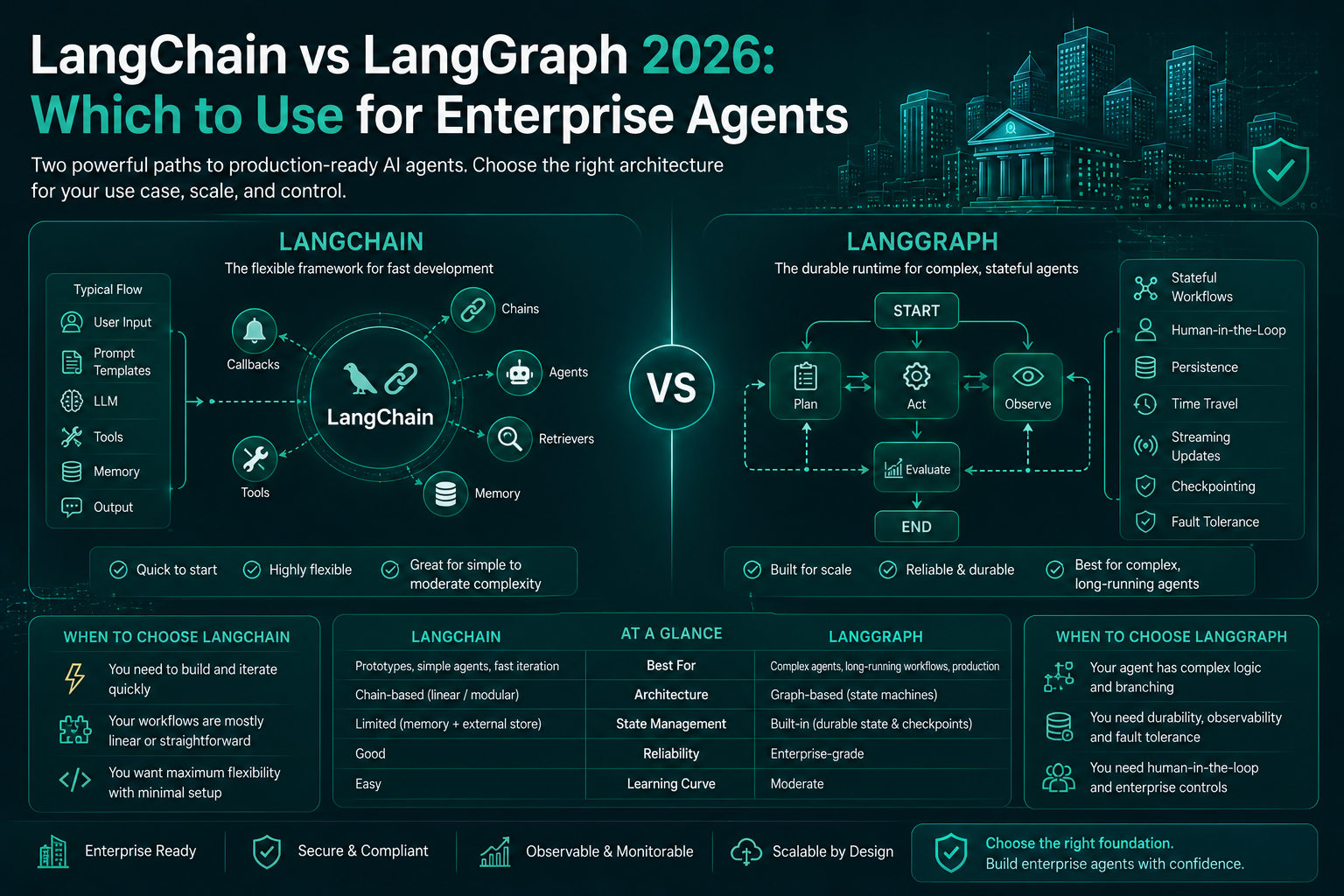
Table of Contents
The LangChain vs LangGraph debate in most online discussions is framed as a framework war: which one is better, which one is winning, which one you should learn. That framing misses the point entirely.
LangChain and LangGraph are not competing solutions to the same problem. They solve different problems, and the architecture decision is about which problem you have — not which framework has better marketing or more GitHub stars.
This guide makes that decision explicit. After three years of building production AI systems in enterprise environments (including regulated financial services), the choice between these frameworks reduces to a small set of questions about your workflow’s shape and your governance requirements. Get those answers right and the framework choice is obvious.
What They Actually Are
LangChain (v0.3+ in 2026) is a composition framework for building LLM pipelines. Its core abstraction is the chain — a sequence of steps where each step takes an input, calls an LLM or tool, and passes output to the next step. LangChain excels at: structured prompt templates, document loaders, output parsers, retrieval integrations, and connecting LLM calls with external data sources in a pipeline.
The LCEL (LangChain Expression Language) syntax makes it concise to compose retrieval + generation pipelines:
from langchain_core.prompts import ChatPromptTemplate
from langchain_anthropic import ChatAnthropic
from langchain_community.vectorstores import Chroma
from langchain_core.output_parsers import StrOutputParser
from langchain_core.runnables import RunnablePassthrough

# A clean RAG chain in LCEL — 8 lines, fully composable
retriever = Chroma(...).as_retriever()
prompt = ChatPromptTemplate.from_template(
    "Answer based on context: {context}\n\nQuestion: {question}"
)
llm = ChatAnthropic(model="claude-sonnet-4-6")

rag_chain = (
    {"context": retriever, "question": RunnablePassthrough()}
    | prompt
    | llm
    | StrOutputParser()
)

response = rag_chain.invoke("What is our refund policy?")
This is LangChain’s sweet spot: a retrieval-augmented pipeline where the flow is linear and each step’s output is the next step’s input. Clean, readable, easy to test.
LangGraph (v0.2+ in 2026) is a stateful graph execution framework. Its core abstraction is the graph — nodes that process state, edges that determine flow (including conditional edges), and a persistent state object that survives across steps. LangGraph is designed for workflows where:
- The flow is not linear (you need branching, loops, retries)
- State needs to persist and evolve across many steps
- Multiple agents need to coordinate with shared state
- Human checkpoints need to interrupt and resume execution
from langgraph.graph import StateGraph, END
from langgraph.checkpoint.sqlite import SqliteSaver
from typing import TypedDict, Annotated
import operator

class AgentState(TypedDict):
    messages: Annotated[list, operator.add]  # Append-only
    risk_score: float
    human_approved: bool
    loop_count: int

def analyst_node(state: AgentState) -> dict:
    # Analyze the case, update risk score
    ...
    return {"risk_score": 0.87, "loop_count": state["loop_count"] + 1}

def router(state: AgentState) -> str:
    if state["risk_score"] > 0.8:
        return "human_review"     # High risk → human gate
    if state["loop_count"] >= 5:
        return END                # Max loops → terminate
    return "analyst"              # Continue analysis

# Persistent checkpointing — human can interrupt and resume
memory = SqliteSaver.from_conn_string("agent_state.db")

graph = StateGraph(AgentState)
graph.add_node("analyst", analyst_node)
graph.add_node("human_review", human_review_node)
graph.add_conditional_edges("analyst", router)
graph.add_edge("human_review", "analyst")

app = graph.compile(checkpointer=memory, interrupt_before=["human_review"])
This is LangGraph’s sweet spot: a multi-step workflow with conditional routing, persistent state, and interruptible human checkpoints.
The Decision Framework
Before choosing a framework, answer these five questions:
1. Is your workflow linear or branching?
Linear: Step A always leads to Step B, which always leads to Step C. The flow does not change based on intermediate results.
→ LangChain (LCEL). You don’t need a graph for a pipeline. A LangChain chain is simpler, easier to debug, and has lower overhead.
Branching: Step A might lead to Step B or Step C depending on what A returns. Step B might loop back to Step A under certain conditions.
→ LangGraph. Conditional edges are LangGraph’s core feature. Implementing conditional branching in LangChain chains requires workarounds (custom runnables, nested chains) that get complicated fast.
2. Does the workflow need to interrupt and resume?
If a human needs to review and approve at a checkpoint — and the workflow should pause at that checkpoint and wait, not time out — you need LangGraph’s checkpointing.
LangGraph’s interrupt_before and interrupt_after mechanisms combined with SqliteSaver or PostgresSaver give you true persistence: the workflow stops at the checkpoint, stores its full state, and resumes when the approval token arrives — even if that’s 4 hours later, even across process restarts.
LangChain has no equivalent of this. If you need interruptible human-in-the-loop, you need LangGraph.
→ LangGraph if yes. This is the dominant consideration for regulated enterprise workflows.
3. Does state need to persist and evolve across many steps?
A LangChain chain passes data between steps but does not maintain a persistent state object that all steps can read and modify. Each step gets the output of the previous step.
A LangGraph workflow maintains a typed State object that persists across all node executions. Every node can read any part of the current state and return updates to specific fields. This is essential for:
- Accumulating evidence across many tool calls
- Tracking metadata (loop count, cost consumed, risk score) that influences routing
- Maintaining a world model that updates as new information arrives
→ LangGraph if yes. The typed state object is the architecture win that matters most for complex workflows.
4. Do multiple agents need to coordinate?
Supervisor patterns (one orchestrator agent delegates to specialist agents) and hierarchical patterns (multiple layers of orchestration) require shared state and inter-agent communication. LangGraph’s Send API and multi-agent graph patterns are designed for exactly this.
LangChain can invoke multiple chains sequentially, but building a supervisor agent that dynamically delegates to different specialist agents based on task type — with shared state and proper error handling — requires you to essentially build a graph runtime on top of LangChain. You’d be re-implementing LangGraph.
→ LangGraph for multi-agent coordination.
5. How much overhead are you willing to accept?
LangGraph has more moving parts than LangChain: the state schema, the graph definition, the checkpoint backend. For a simple RAG chain or a single-step tool call, LangGraph is architectural overengineering.
LangChain + LCEL is lighter. The streaming API is clean. The integration ecosystem (document loaders, vector store integrations, output parsers) is extensive and well-maintained.
→ LangChain for simpler pipelines where the overhead isn’t justified.
The Matrix
| Workflow Characteristic | LangChain | LangGraph |
|---|---|---|
| Linear RAG pipeline | ✅ Native | Overkill |
| Branching conditional flow | Workaround | ✅ Native |
| Human-in-the-loop with interrupts | ❌ | ✅ Native |
| Persistent state across steps | ❌ | ✅ Native |
| Multi-agent coordination | Workaround | ✅ Native |
| Simple prompt + retrieval | ✅ Native | Overkill |
| Document loading / parsing | ✅ Extensive | Via LangChain |
| Streaming output | ✅ Clean | ✅ Supported |
| Production debuggability | Medium | High (with LangSmith) |
| Learning curve | Low | Medium |
| Enterprise governance (audit, checkpoints) | Limited | ✅ Strong |
When to Use Neither
There is a third option that the LangChain-vs-LangGraph framing erases: use the provider SDK directly.
For simple, single-call use cases — a structured extraction, a document classification, a one-shot generation with a specific output schema — both LangChain and LangGraph add abstraction overhead without adding value. The Anthropic SDK with tool use and structured output handles most single-step use cases cleanly:
import anthropic

client = anthropic.Anthropic()

# Direct SDK — simpler, faster, fewer dependencies
response = client.messages.create(
    model="claude-sonnet-4-6",
    max_tokens=1024,
    tools=[{
        "name": "extract_transaction_risk",
        "description": "Extract risk signals from a transaction record",
        "input_schema": {
            "type": "object",
            "properties": {
                "risk_score": {"type": "number"},
                "risk_flags": {"type": "array", "items": {"type": "string"}},
                "requires_review": {"type": "boolean"}
            },
            "required": ["risk_score", "risk_flags", "requires_review"]
        }
    }],
    messages=[{"role": "user", "content": f"Analyze: {transaction_data}"}]
)
Use the provider SDK directly when:
- You have one or two LLM calls with no orchestration
- You don’t need document loading, retrieval, or complex pipeline composition
- You want minimal dependencies and maximum control
- You’re integrating into an existing codebase where adding LangChain’s dependency footprint is unjustified
What Changed in 2026
The 2026 versions of both frameworks matter for this comparison.
LangChain v0.3+ reorganized its package structure into langchain-core (abstractions), langchain (general chains), and provider-specific packages (langchain-anthropic, langchain-openai, etc.). This significantly reduced the dependency footprint — you no longer need to install the full LangChain ecosystem to use a small subset of it. For production deployments where dependency management is a concern, this is a material improvement.
LCEL streaming and async support improved substantially. For high-throughput enterprise applications, the performance gap between LangChain v0.1 and v0.3 is real and worth noting in upgrade decisions.
LangGraph v0.2+ added the Send API for dynamic fan-out (spawning multiple parallel subgraph executions), improved the interrupt_before / interrupt_after mechanism, and added native support for multi-agent supervisor patterns. The LangGraph Platform (cloud-hosted execution engine) also matured significantly, though most enterprise teams with data residency requirements will still prefer self-hosted execution.
The key LangGraph 2026 additions relevant to enterprise agents:
- Streaming token output from within graph nodes (v0.2 finally made this clean)
- Subgraph composition for building modular multi-agent architectures
- Built-in memory store (separate from checkpoint — for long-term agent memory across threads)
The Enterprise Deployment Pattern
For enterprise production deployments in 2026, the pattern I use is a composition:
# LangChain handles retrieval and structured output parsing
# LangGraph handles agent orchestration and state management

from langchain_community.vectorstores import Chroma
from langchain_anthropic import ChatAnthropic
from langchain_core.output_parsers import JsonOutputParser
from langgraph.graph import StateGraph

# LangChain component: RAG retrieval chain
retrieval_chain = build_rag_chain(vector_store, llm)  # LangChain's strength

# LangGraph component: Agent orchestration
class AnalysisState(TypedDict):
    query: str
    retrieved_context: str
    analysis: dict
    risk_level: str
    human_approved: bool

def retrieve_node(state: AnalysisState) -> dict:
    # Use LangChain retrieval chain inside a LangGraph node
    context = retrieval_chain.invoke(state["query"])
    return {"retrieved_context": context}

def analyze_node(state: AnalysisState) -> dict:
    # LLM analysis with state from prior steps
    ...

# LangGraph handles the workflow, checkpointing, and human gates
# LangChain handles the retrieval and parsing inside the nodes
This is the most common production pattern: LangGraph as the workflow engine, LangChain components (retrievers, parsers, document loaders) as building blocks inside graph nodes. They compose naturally — LangGraph doesn’t prevent you from using LangChain; it gives the overall workflow the stateful, interruptible architecture that LangChain alone can’t provide.
LangSmith: The Observability Layer You Need Either Way
Regardless of which framework you choose, LangSmith (LangChain’s observability platform) is worth evaluating for enterprise production use. It provides:
- Trace visualization for every chain or graph run
- Prompt version comparison
- Dataset management for evaluation
- Production monitoring with latency, cost, and token tracking
The main alternative is LangFuse, which is open-source and works with both LangChain and LangGraph (and any LLM framework) via OpenTelemetry. For enterprises with data residency requirements that prevent sending traces to LangSmith’s cloud, LangFuse self-hosted is the production answer.
The Bottom Line
Use LangChain when you’re building retrieval pipelines, document processing workflows, or single-path LLM chains. Its composition model is clean, its integration ecosystem is the broadest available, and its overhead is low for the problems it’s designed for.
Use LangGraph when your workflow has branching, loops, human checkpoints, persistent state, or multi-agent coordination. These are not LangChain features — they are LangGraph’s core design. Trying to implement them in LangChain requires you to build a graph runtime, which is reinventing LangGraph.
Use the provider SDK directly when you have one or two LLM calls with no orchestration need. Both frameworks add overhead that isn’t justified for simple use cases.
The enterprise guidance is specific: for any agentic workflow with human-in-the-loop requirements (which is nearly every workflow in regulated financial services), LangGraph is the correct choice. The interruptible checkpoint architecture maps directly onto materiality-gated oversight requirements. LangChain’s pipeline model does not.
Related Reading
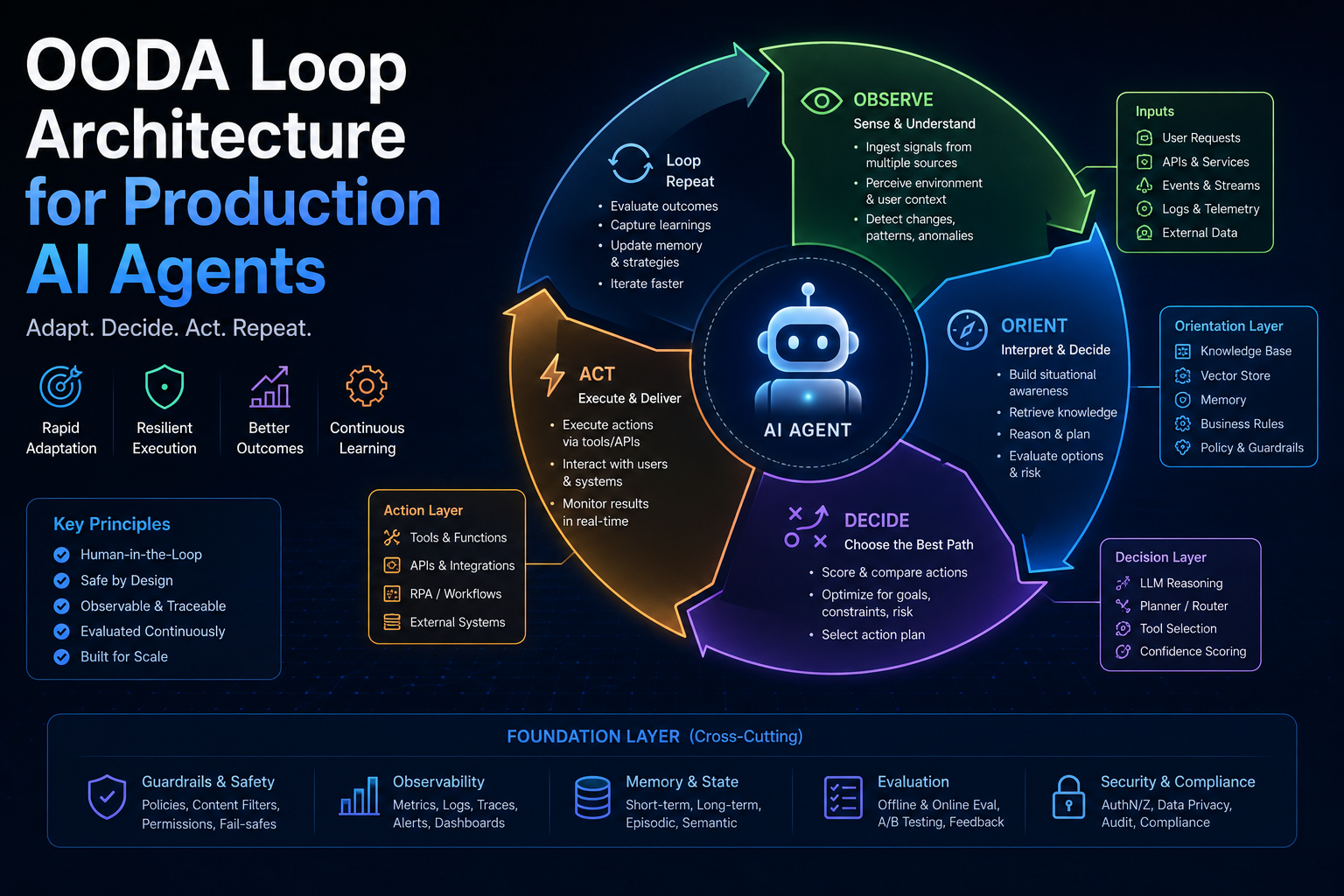
- OODA Loop Architecture for Production AI Agents — the agent decision loop that LangGraph implements most naturally
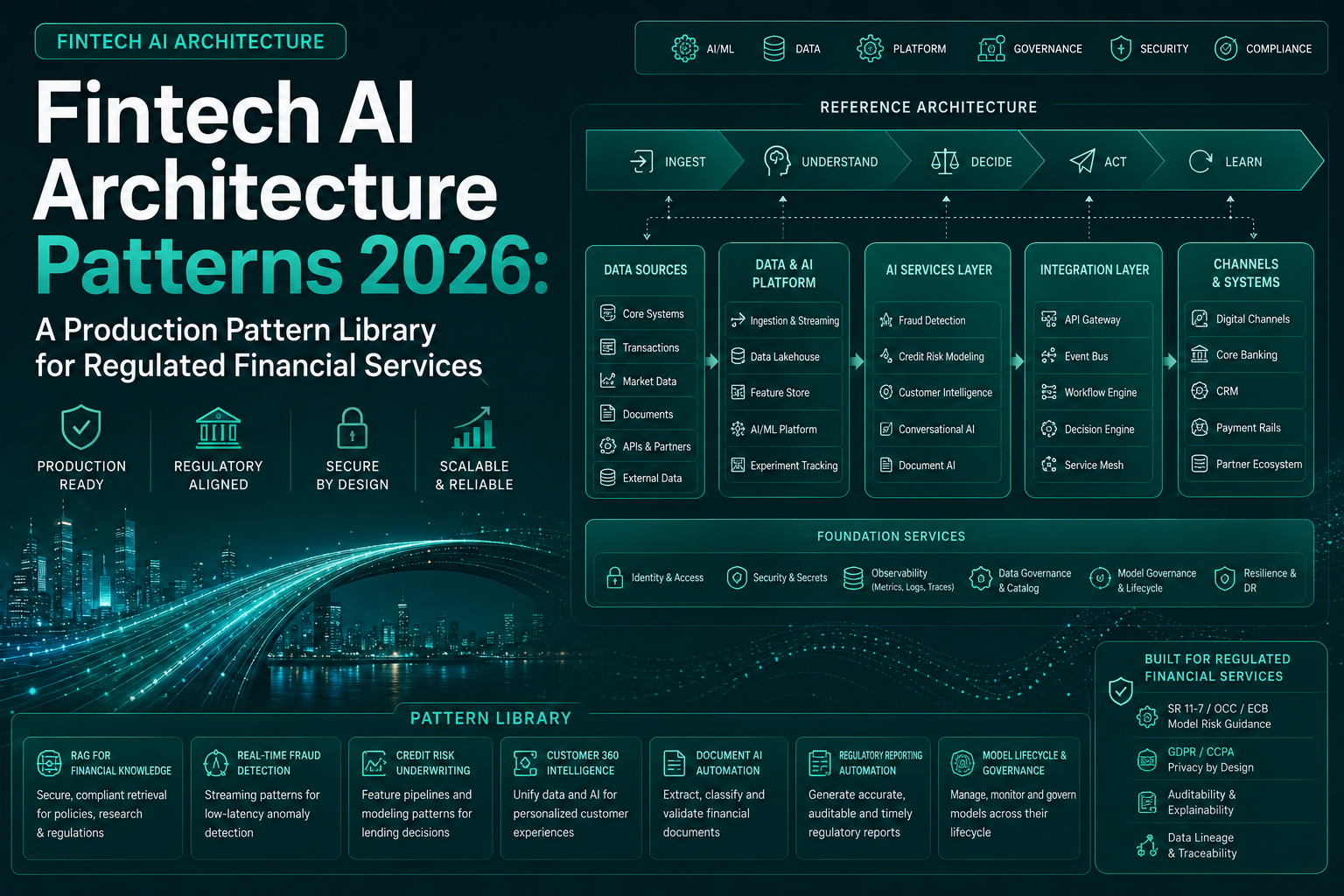
- Fintech AI Architecture Patterns 2026 — Pattern 3 shows the LangGraph agent pattern for regulated decision workflows
- Agentic AI Architecture Hub — the full framework for production agent architecture decisions
Enterprise AI Architecture
Want more enterprise AI architecture breakdowns?
Subscribe to SuperML.