Components of a Production RAG System: Architecture, Retrieval, Generation, and Evaluation
A production RAG system is more than a vector database connected to an LLM. This guide breaks down the core components: ingestion, chunking, embeddings, retrieval, reranking, prompt assembly, generation, evaluation, observability, and governance.

Table of Contents
Retrieval-Augmented Generation, or RAG, is an architecture pattern that combines information retrieval with language generation. Instead of relying only on the model’s internal training data, a RAG system retrieves relevant context from external sources and uses that context to generate a grounded answer.
This makes RAG useful for enterprise systems where answers must reflect current documents, policies, product data, customer records, knowledge bases, or domain-specific procedures.
However, a production RAG system is not just a vector database attached to a chatbot. It requires a full pipeline for ingestion, indexing, retrieval, ranking, prompt construction, generation, evaluation, monitoring, and governance.
What Problem Does RAG Solve?
Large language models are strong at reasoning over language, but they have three practical limitations in enterprise use cases:
- Knowledge freshness: the model may not know recent or private information.
- Source grounding: the model may generate plausible answers without evidence.
- Domain specificity: the model may not understand internal terminology, policies, or business rules.
RAG addresses these limitations by retrieving relevant information at query time and injecting it into the model context.
A simplified flow looks like this:
User Query
   ↓
Query Understanding
   ↓
Retriever
   ↓
Relevant Documents / Chunks
   ↓
Reranker and Context Builder
   ↓
Prompt Assembly
   ↓
Language Model
   ↓
Grounded Response + Citations
Core Components of a RAG System
A production RAG system usually contains the following components:
| Component | Purpose |
|---|---|
| Data ingestion | Loads source documents from systems such as websites, PDFs, databases, SharePoint, Confluence, S3, or CRM platforms. |
| Document parsing | Extracts text, tables, metadata, and structure from source files. |
| Chunking | Splits documents into retrievable units. |
| Embedding model | Converts chunks and queries into vector representations. |
| Vector store / search index | Stores embeddings and supports similarity search. |
| Retriever | Finds candidate chunks for a query. |
| Reranker | Reorders retrieved chunks by relevance. |
| Context builder | Selects and formats evidence for the LLM prompt. |
| Prompt manager | Applies instruction templates, policies, and response constraints. |
| Language model | Generates the final response. |
| Evaluator | Measures retrieval quality, answer quality, faithfulness, and latency. |
| Observability layer | Tracks traces, latency, cost, errors, and user feedback. |
| Governance layer | Applies access control, privacy, auditability, and compliance rules. |
Each component affects the quality of the final answer. A weak ingestion pipeline or poor chunking strategy can cause bad answers even when the LLM itself is strong.
1. Data Ingestion
The ingestion layer brings enterprise knowledge into the RAG pipeline. Common sources include:
- internal documentation
- product manuals
- customer support articles
- PDFs and policy documents
- CRM records
- database tables
- emails or tickets
- knowledge graphs
- regulatory documents
The ingestion process should capture both content and metadata. Metadata is important because it allows filtering, access control, citation, freshness checks, and lineage tracking.
Useful metadata includes:
- document ID
- title
- source system
- author or owner
- created date
- updated date
- access permissions
- department or domain
- document version
- URL or source path
A RAG system that ignores metadata will struggle in production because it cannot reliably answer questions such as:
- Is this document still current?
- Is the user allowed to see this content?
- Which source was used for the answer?
- Which version of the policy was retrieved?
2. Document Parsing
Document parsing converts source material into clean machine-readable text. This sounds simple, but it is often one of the hardest parts of production RAG.
PDFs, slides, spreadsheets, web pages, and scanned documents may contain:
- headers and footers
- tables
- images
- charts
- code blocks
- nested sections
- page numbers
- repeated navigation text
- OCR errors
Poor parsing creates noisy chunks. Noisy chunks reduce retrieval quality and increase hallucination risk.
A strong parsing pipeline should preserve structure where possible:
{
  "document_id": "policy-1024",
  "title": "Credit Card Eligibility Policy",
  "section": "Income Verification",
  "page": 7,
  "text": "Applicants must provide income verification when...",
  "source_url": "s3://policies/credit-card-eligibility.pdf"
}
For regulated or high-risk use cases, document structure matters. The difference between a policy heading, a footnote, and an exception clause can change the answer.
3. Chunking
Chunking splits documents into smaller retrievable units. The objective is to create chunks that are large enough to preserve meaning but small enough to retrieve precisely.
Common chunking strategies include:
| Strategy | Description | Best fit |
|---|---|---|
| Fixed-size chunking | Splits text by token or character count. | Simple documentation and quick prototypes. |
| Recursive chunking | Splits by section, paragraph, sentence, then token limit. | General-purpose RAG systems. |
| Semantic chunking | Splits based on topic boundaries or embedding similarity. | Long-form content with topic shifts. |
| Structure-aware chunking | Uses headings, tables, page numbers, and document layout. | Policies, manuals, contracts, and technical docs. |
| Entity-aware chunking | Keeps entities and relationships together. | Knowledge graph and domain-heavy use cases. |
Chunk size should be tested, not guessed. Smaller chunks may improve precision but lose context. Larger chunks may preserve context but introduce irrelevant text.
Typical starting points:
- 300 to 800 tokens for support articles
- 500 to 1,200 tokens for technical documentation
- section-based chunks for policy or legal documents
- table-preserving chunks for financial or operational data
4. Embedding Model
An embedding model converts text into numerical vectors. These vectors capture semantic similarity, allowing the system to retrieve documents that are related in meaning, not just keyword overlap.
For example, these two queries may be semantically related even though they use different words:
How do I reset my password?
I cannot access my account.
Embedding model selection matters. A weak embedding model can miss relevant documents even when the knowledge base contains the correct answer.
When selecting an embedding model, evaluate:
- retrieval accuracy
- language support
- domain vocabulary coverage
- latency
- vector dimension
- cost
- deployment model: API, self-hosted, or local
- support for long inputs
- performance on your actual documents
Do not choose embeddings only based on benchmark scores. Test retrieval quality using representative user questions and real documents.
5. Vector Store and Search Index
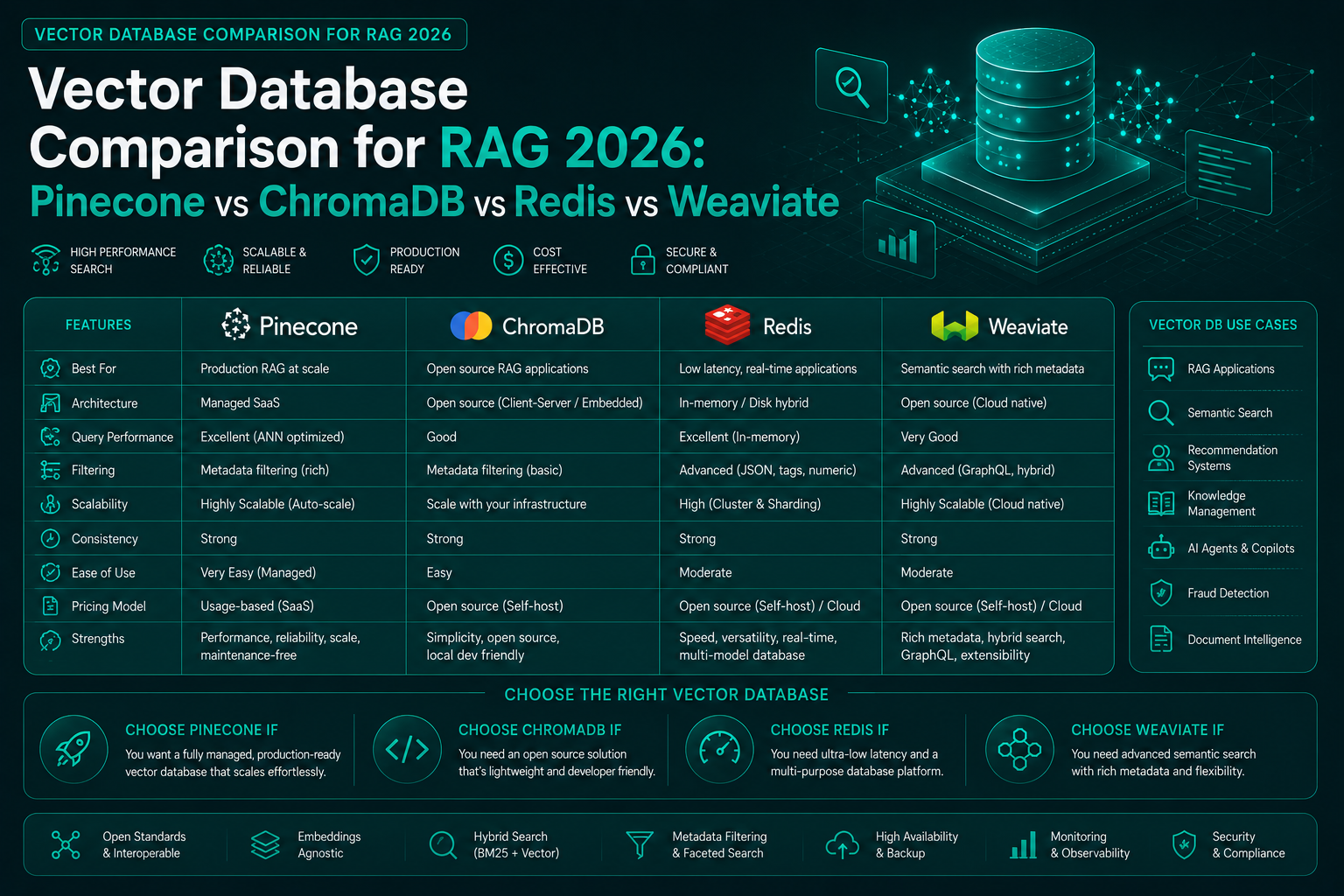
A vector store indexes embeddings and supports similarity search. Common options include Pinecone, Weaviate, Milvus, Qdrant, Chroma, Elasticsearch, OpenSearch, Redis, and PostgreSQL with pgvector.
The vector store is responsible for retrieving candidate chunks quickly. In production, it should support:
- metadata filtering
- hybrid search
- namespace or tenant isolation
- access control integration
- index versioning
- backups
- monitoring
- scalable ingestion
- low-latency query performance
Vector search alone is often not enough. Enterprise RAG systems usually benefit from hybrid retrieval.
6. Retrieval
Retrieval is the process of finding candidate chunks for a user query.
Common retrieval methods include:
| Retrieval method | Description |
|---|---|
| Dense retrieval | Uses embedding similarity. |
| Sparse retrieval | Uses keyword-based search such as BM25. |
| Hybrid retrieval | Combines vector similarity and keyword search. |
| Metadata-filtered retrieval | Restricts results by user, product, region, date, department, or document type. |
| Query expansion | Rewrites or expands the query to improve recall. |
| Multi-query retrieval | Generates multiple related queries and merges results. |
For enterprise use cases, hybrid retrieval is often stronger than pure vector search. Keyword search helps with exact terms, product codes, policy IDs, error messages, names, and abbreviations. Dense retrieval helps with semantic meaning.
A reliable retriever should answer four questions:
- Did it find the right documents?
- Did it rank them near the top?
- Did it filter out restricted or irrelevant content?
- Did it return enough evidence for the model to answer accurately?
7. Reranking
The initial retriever often returns a broad set of candidates. A reranker scores those candidates again using a more precise model.
The typical flow is:
Retrieve top 50 chunks
   ↓
Rerank top 50 using cross-encoder or LLM-based relevance scoring
   ↓
Select top 5 to 10 chunks for the prompt
Reranking improves answer quality because the final prompt has limited context space. The system should not pass every retrieved chunk to the model. It should pass the best evidence.
Reranking is especially useful when:
- documents are long
- many chunks are semantically similar
- the knowledge base contains duplicate or near-duplicate content
- exact policy language matters
- the model context window is expensive or limited
8. Context Builder
The context builder decides which retrieved evidence goes into the final prompt and how it is formatted.
This layer is important because the LLM does not see the entire knowledge base. It only sees the selected context.
A good context builder should:
- remove duplicate chunks
- preserve source citations
- keep section headings
- order evidence logically
- avoid mixing conflicting versions
- fit within token limits
- include metadata when useful
- separate source content from instructions
Example context format:
SOURCE 1
Title: Credit Card Eligibility Policy
Section: Income Verification
Updated: 2025-03-12
Content: Applicants must provide income verification when...

SOURCE 2
Title: Exception Handling Guide
Section: Manual Review
Updated: 2025-04-02
Content: If income verification fails, route the application to...
This format makes source attribution easier and reduces the chance that the model blends unrelated evidence.
9. Prompt Management
Prompt management defines how the model should use retrieved context. In production systems, prompts should not be scattered across application code.
A prompt layer should manage:
- system instructions
- domain-specific rules
- tone and formatting
- citation requirements
- refusal behavior
- safety constraints
- JSON or schema output requirements
- fallback instructions when evidence is missing
A simple RAG prompt may look like this:
You are an enterprise knowledge assistant.
Answer the user question using only the provided sources.
If the sources do not contain enough information, say that the answer is not available in the provided context.
Cite the source title and section for each important claim.

User question:
{question}

Retrieved sources:
{context}
The most important rule is this: the model should not be allowed to invent an answer when retrieval fails.
10. Language Model
The language model generates the final answer using the prompt and retrieved context.
Model choice depends on the use case:
| Requirement | Model consideration |
|---|---|
| Low latency | Smaller model or optimized inference. |
| Complex reasoning | Stronger general-purpose model. |
| Sensitive data | Private deployment or strict data controls. |
| Structured output | Model with strong JSON/schema-following ability. |
| Cost control | Smaller model with better retrieval and reranking. |
| Multilingual support | Model tested on target languages. |
A stronger model does not fix a weak retrieval pipeline. In many RAG systems, retrieval quality has a larger impact than model size.
11. Evaluation
RAG evaluation must measure both retrieval and generation. Evaluating only the final answer hides the root cause of failure.
Key retrieval metrics include:
| Metric | Meaning |
|---|---|
| Recall@k | Whether the correct source appears in the top k retrieved results. |
| Precision@k | How many retrieved chunks are actually relevant. |
| MRR | How high the first relevant result appears in the ranking. |
| nDCG | Whether highly relevant documents rank above weakly relevant ones. |
Key generation metrics include:
| Metric | Meaning |
|---|---|
| Faithfulness | Whether the answer is supported by retrieved context. |
| Answer relevance | Whether the answer directly addresses the question. |
| Context relevance | Whether selected context was useful. |
| Citation accuracy | Whether citations support the claims made. |
| Refusal accuracy | Whether the system correctly refuses when evidence is insufficient. |
Operational metrics include:
- end-to-end latency
- retrieval latency
- model latency
- token usage
- cost per query
- error rate
- timeout rate
- cache hit rate
- user feedback
For production RAG, build a test set of real user questions with expected sources and expected answer characteristics. This allows regression testing when you change chunking, embeddings, retrieval, reranking, prompts, or models.
12. Observability
Observability helps teams understand why a RAG system produced a specific answer.
A useful trace should capture:
- user query
- rewritten query, if any
- retrieval filters
- retrieved chunks
- reranked chunks
- final context sent to the model
- prompt template version
- model name and version
- generated answer
- latency by stage
- token usage
- errors
- feedback
Without tracing, debugging becomes guesswork. If an answer is wrong, the team needs to know whether the problem came from ingestion, chunking, retrieval, reranking, prompt design, or model behavior.
13. Governance, Security, and Compliance
Enterprise RAG systems must enforce governance controls. This is especially important in banking, healthcare, insurance, legal, HR, and customer support environments.
Important controls include:
- role-based access control
- document-level permissions
- row-level and field-level filtering
- PII redaction
- audit logs
- prompt and response logging policies
- source attribution
- data retention rules
- model risk management
- human review for high-risk decisions
A RAG system should not retrieve content the user is not allowed to access. Access control must happen before the model sees the context, not after the response is generated.
Common Failure Modes
RAG systems fail in predictable ways.
| Failure mode | Cause | Mitigation |
|---|---|---|
| Correct document not retrieved | Poor chunking, weak embeddings, missing metadata, or bad query handling. | Improve chunking, hybrid retrieval, query rewriting, and evaluation. |
| Wrong chunk retrieved | Similar documents, duplicated content, or weak ranking. | Add reranking and metadata filters. |
| Answer not grounded | Model ignores context or context is insufficient. | Strengthen prompt rules and refusal behavior. |
| Citation mismatch | Context builder loses source mapping. | Preserve chunk IDs and source metadata throughout the pipeline. |
| Stale answer | Old document retrieved over current version. | Add versioning, freshness filters, and document lifecycle controls. |
| Sensitive data leakage | Retrieval ignores permissions. | Enforce access control before retrieval and context assembly. |
| High latency | Too many retrieval steps, large context, or slow model. | Add caching, reranking limits, optimized indexes, and model routing. |
| High cost | Excessive context and expensive model calls. | Improve retrieval precision, reduce prompt size, and use tiered models. |
Reference Python Example: Minimal RAG Flow
The following example is intentionally minimal. It demonstrates the basic flow but should not be treated as production-ready.
from dataclasses import dataclass
from typing import List
import math


@dataclass
class DocumentChunk:
    chunk_id: str
    text: str
    source: str
    embedding: List[float]


def cosine_similarity(a: List[float], b: List[float]) -> float:
    dot = sum(x * y for x, y in zip(a, b))
    norm_a = math.sqrt(sum(x * x for x in a))
    norm_b = math.sqrt(sum(y * y for y in b))
    if norm_a == 0 or norm_b == 0:
        return 0.0
    return dot / (norm_a * norm_b)


def toy_embed(text: str) -> List[float]:
    # Demonstration only. Use a real embedding model in production.
    tokens = text.lower().split()
    return [
        len(tokens),
        sum(len(token) for token in tokens),
        1.0 if "rag" in tokens else 0.0,
        1.0 if "retrieval" in tokens else 0.0,
        1.0 if "generation" in tokens else 0.0,
    ]


class SimpleRetriever:
    def __init__(self, chunks: List[DocumentChunk]):
        self.chunks = chunks

    def retrieve(self, query: str, top_k: int = 3) -> List[DocumentChunk]:
        query_embedding = toy_embed(query)
        ranked = sorted(
            self.chunks,
            key=lambda chunk: cosine_similarity(query_embedding, chunk.embedding),
            reverse=True,
        )
        return ranked[:top_k]


def build_context(chunks: List[DocumentChunk]) -> str:
    context_blocks = []
    for chunk in chunks:
        context_blocks.append(
            f"Source: {chunk.source}\nChunk ID: {chunk.chunk_id}\nContent: {chunk.text}"
        )
    return "\n\n".join(context_blocks)


def generate_answer(question: str, context: str) -> str:
    # Replace this with a real LLM call.
    return (
        "Use the retrieved context to answer the question.\n\n"
        f"Question: {question}\n\n"
        f"Retrieved context:\n{context}"
    )


raw_chunks = [
    ("1", "RAG combines retrieval with language generation.", "rag-architecture.md"),
    ("2", "Embedding models convert text into vectors for semantic search.", "embedding-guide.md"),
    ("3", "Reranking improves the relevance of retrieved chunks before generation.", "reranking-guide.md"),
]

chunks = [
    DocumentChunk(
        chunk_id=chunk_id,
        text=text,
        source=source,
        embedding=toy_embed(text),
    )
    for chunk_id, text, source in raw_chunks
]

retriever = SimpleRetriever(chunks)
question = "What are the main components of a RAG system?"
retrieved_chunks = retriever.retrieve(question)
context = build_context(retrieved_chunks)
answer = generate_answer(question, context)

print(answer)
In a real implementation, replace the toy embedding function with a production embedding model, use a scalable search index, apply metadata filtering, add reranking, and log the full trace for observability.
Production Readiness Checklist
Before deploying a RAG system, validate the following:
- Source documents are parsed correctly.
- Chunks preserve enough context to answer questions accurately.
- Metadata includes source, version, ownership, and permissions.
- Retrieval quality is measured with a test set.
- Reranking is evaluated against retrieval-only performance.
- The prompt includes clear grounding and refusal rules.
- The model does not answer when evidence is missing.
- Citations map back to exact source chunks.
- Access control is enforced before context reaches the model.
- Latency and cost are monitored by pipeline stage.
- Evaluation runs automatically after major pipeline changes.
- User feedback is captured and reviewed.
Summary
A RAG system is a multi-stage architecture, not a single model call. The quality of the final answer depends on the full pipeline: ingestion, parsing, chunking, embeddings, retrieval, reranking, context assembly, prompt management, generation, evaluation, observability, and governance.
For prototypes, a simple vector store and LLM prompt may be enough. For enterprise systems, that is not sufficient. Production RAG requires measurable retrieval quality, controlled generation, source attribution, access control, operational monitoring, and continuous evaluation.
The most reliable RAG systems are built like search and knowledge platforms first, and chatbot experiences second.
Related Reading
Enterprise AI Architecture
Want more enterprise AI architecture breakdowns?
Subscribe to SuperML.